User Guide
Welcome to ScoreTap
Thank you for using ScoreTap by AkiWorkshop.
ScoreTap is a simple and reliable digital scoreboard designed for basketball and volleyball practices, recreation, church activities, school events, and friendly competitions.
It is optimized for iPhone, iPad, Apple Watch, TVs, monitors, and projectors.
Getting Started
- Launch ScoreTap.
- Select Basketball or Volleyball mode.
- Edit the team names if needed by long-pressing the team name.
- Begin scoring by tapping the score.
- Connect your device to a TV or projector for a large scoreboard display (optional).
Scoring
Team Scores
- Tap a team's score to add 1 point.
- Long-press a team's score to subtract 1 point.
- Tap UNDO to restore the previous score.
Team Names
- Long-press a team name to edit it.
- Swipe left or right across either team name to swap the left and right teams.
- This is useful when teams change court sides or benches.
Basketball Mode
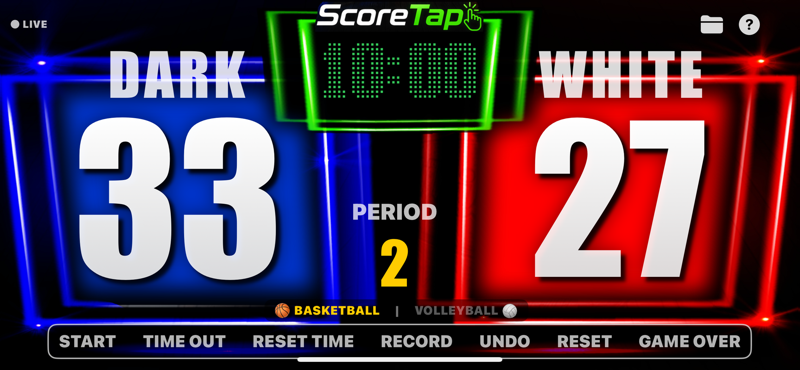
- Countdown game clock
- Period display (1–4)
- Team scores
- Sound effects
- Apple Watch remote support
- Bluetooth keyboard support
Controls
START starts the game clock.
TIME OUT stops the clock and displays a TIME OUT message.
RESET TIME resets the game clock to the configured starting time.
PERIOD tap to advance to the next period. Long-press to return to the previous period.
* Default Team Names: WHITE and DARK

In many recreational and pickup basketball games, players are divided into mixed teams and wear reversible basketball jerseys. One team wears the white side, while the other wears the dark side for easy identification.
For this reason, ScoreTap uses WHITE and DARK as the default team names in Basketball Mode.
Of course, you can rename the teams at any time by long-pressing a team name. When the teams switch sides, simply swipe either team name left or right to swap the teams on the scoreboard.
Volleyball Mode
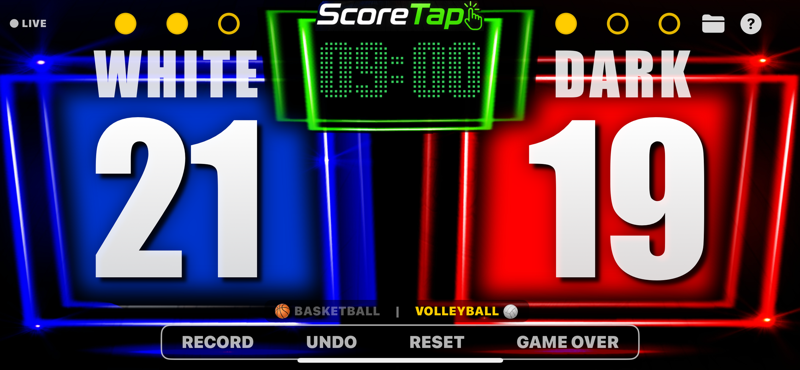
- Current time display
- Team scores
- Set-win indicators
- Apple Watch support
- Bluetooth keyboard support
Set Wins
- Tap the circles to add a set win.
- Long-press the circles to remove a set win.
- RESET clears both scores and set-win indicators.
Apple Watch
ScoreTap supports Apple Watch as a wireless remote controller.
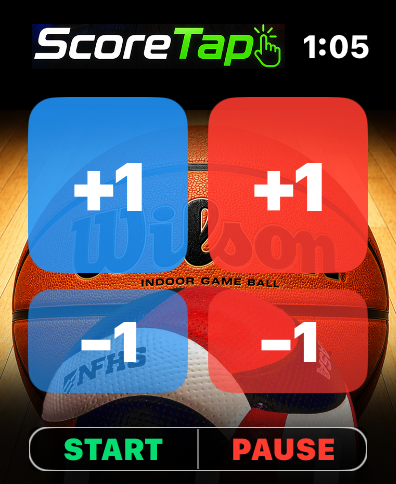
- Left Team +1
- Left Team −1
- Right Team +1
- Right Team −1
- START
- PAUSE / TIME OUT
This allows coaches and officials to control the scoreboard while moving freely around the court.
Bluetooth Keyboard
- ← Left Team +1
- → Right Team +1
- X then ← Left Team −1
- X then → Right Team −1
- S Start
- T Time Out
- W Whistle
Saving Records
Tap RECORD to save the current scoreboard status.
- Date and time
- Sport mode
- Team names
- Team scores
- Basketball period or volleyball set wins
Records are stored locally on your device.
Opening Records
Tap the folder icon near the Help button. You can open previously saved records, delete individual records, delete all records, and view saved game history.
Reports
Select one or more saved records and tap REPORT. A game report is automatically generated and can be shared using iOS.
Supported destinations include Apple Notes, Mail, Messages, LINE, WhatsApp, and any other app that supports text sharing.
Frequently Asked Questions
Does ScoreTap require an Internet connection?
No. ScoreTap works completely offline.
Where are my saved records stored?
Game records are stored locally on your device. Deleting the app may also remove the saved records.
Can I display the scoreboard on a TV?
Yes. You can use AirPlay screen mirroring or an HDMI adapter to display ScoreTap on a TV, monitor, or projector.
Is ScoreTap designed for official tournaments?
No. ScoreTap is intended for practices, recreation, church events, school activities, and friendly competitions.
Need Help?
If you have questions, suggestions, or would like to report a bug, please visit the Support page.